

TubeBuddy Pricing 2026: Plans, Costs, Limits & Features

Some links on this site are affiliate links. If you purchase through them, we may earn a commission at no extra cost to you. These commissions help us improve the content and resources we provide.

TubeBuddy Pricing for 2026: What’s Available by Plan & Feature, Plus Billing Options and Limits. We detail all the current pricing for TubeBuddy in this post, listing limits for each plan and feature included. Compare all TubeBuddy plans here.

Want a simpler way to plan and grow a faceless YouTube channel? Download the Free YouTube Automation Guide for a practical step-by-step workflow covering content ideas, scripting, production, optimization, and publishing.
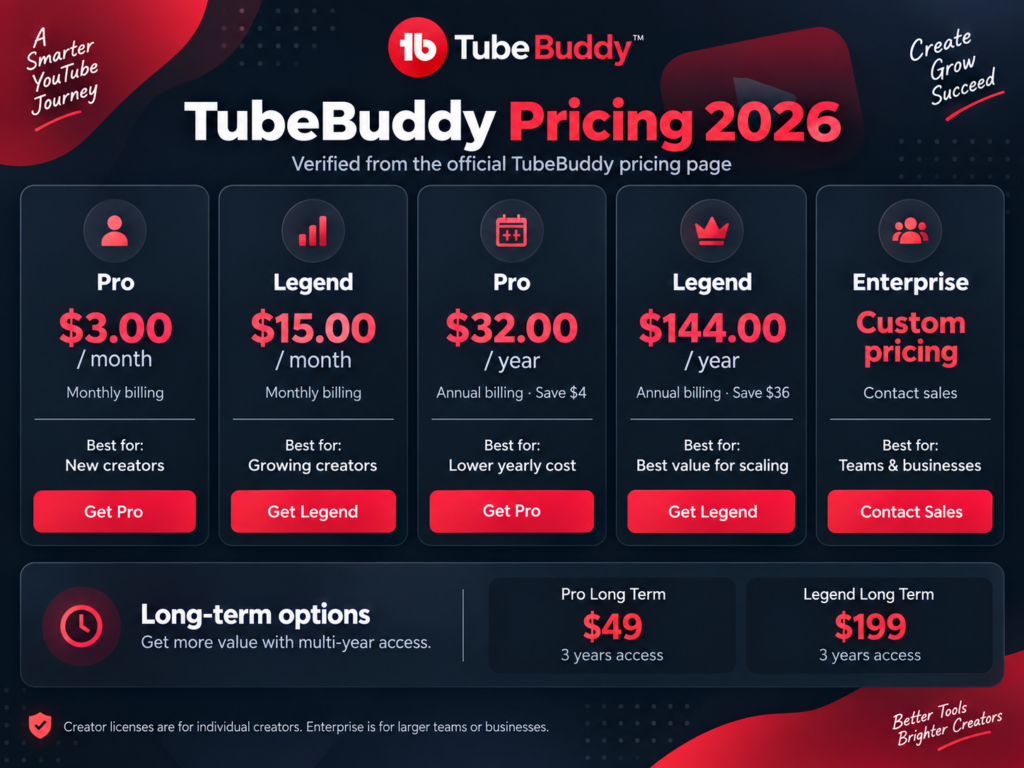
TubeBuddy Pricing 2026 plans and costs

TubeBuddy Pricing Overview for 2026

TubeBuddy keeps its pricing fairly simple in 2026. The main creator plans are Pro and Legend. Each plan also has different billing options.

The Pro plan costs $3 per month with monthly billing. It is designed for creators who want stronger optimization tools without paying for Legend. Annual billing costs $32 per year. This reduces the total yearly cost.

The Legend plan costs $15 per month. It is designed for creators who need a broader set of tools. Legend includes everything in Pro. It also adds advanced reporting and analytics, full search and SEO access, and bulk processing and editing tools. Annual billing is $144 per year.

TubeBuddy also offers longer-term access. Pro Long Term costs $49 for three years. Legend Long Term costs $199 for three years.These options remove monthly renewals for three years.

Ready to compare the current TubeBuddy plans for yourself? You can check TubeBuddy pricing and plans here and choose the option that best matches your channel workflow.

The cheapest plan is not always the best fit. Pro suits creators who mainly need optimization tools. Legend is better for larger video libraries. It also works well for more demanding workflows. Its bulk tools and deeper reporting become more useful as a channel grows.

Next, we will look at each plan separately. This makes it easier to see exactly what you are paying for.

TubeBuddy Pricing Pro Plan: What Do You Get for $3 per Month?

The TubeBuddy Pro plan costs $3 per month when paid monthly. It’s possible to pay annually for $32 per year, which makes it the lowest priced TubeBuddy paid plan for creators who want more than the basic TubeBuddy experience but are not ready to upgrade to the Legend plan yet.

Pro is for the everyday creator tools that help optimize a channel on a day to day basis. Basic video/thumbnail tools, title/tag optmization, content strategy tools, audience tools, YouTube Shorts linking, and topical analysis. In other words, these features are meant to make daily channel optimization easier, not turn TubeBuddy into a full channel management tool.

For solo creators, Pro is a set of practical optimization tools for a low monthly fee. Creators who require more in-depth analytics, full search and SEO capabilities, and/or bulk editing will need to step up to the Legend plan.

TubeBuddy Pricing Legend Plan: What Do You Get for $15 per Month?

The TubeBuddy Legend plan costs $15 per month on monthly billing. If you pay annually, the price is $144 per year, so the yearly option reduces the total cost compared with paying month by month. TubeBuddy also currently lists a Legend Long Term option at $199 for three years.

The Legend plan builds on all the features in the Pro plan. Legend is especially made for creators who work with larger channels or video libraries and want more control over their work. It adds features like advanced reporting and analytics, full search and SEO access, bulk editing and processing features, advanced audience insights, linking to YouTube Shorts, and much more topical analysis.

There are many differences in terms of workflow, and it largely depends on your specific needs. If you have many videos and update metadata on a regular basis, Legend has a number of tools to save time. However, for smaller channels, it may not be worth paying for these additional features unless you actually use them.

Legend is primarily designed for larger scale content, bulk upload, advanced reporting and is suited for more established creators with a large library of content. While it does basic optimization, it is not designed to be the primary tool for initial optimization efforts.

How Much Can You Save on TubeBuddy Over Three Years?

The billing cycle makes a bigger difference than you think. The total cost for 3 years makes the gap between the two options even clearer.

First, calculate the total cost of the Pro version paid month by month over three years: $108. Then, compare that to paying annually: $96. The three-year Pro subscription would cost $49 over the same time frame. That saves $59 compared to the monthly rate.

The difference becomes much larger with Legend. Monthly payments would total $540 over three years. Annual billing would bring that down to $432. The three-year Legend option costs $199.

By pre-paying for a year or more, creators who expect to use Legend for several years can save as much as $341 over the same period when compared with using a monthly plan. Compared with simply renewing the annual plan option three times, creators can save $233 by opting for the long-term membership instead.

Just because something is the cheapest long-term, does not mean it is the best choice for new creators. Many prefer to pay monthly to test out TubeBuddy first. This way you have locked yourself into nothing and can change to a different plan at any time.

This price calculation is different for established creators running a faceless YouTube channel or YouTube automation. If TubeBuddy is already part of your standard workflow for publishing and optimization, the long-term price actually brings down the price per month considerably.

What Is Included in Each TubeBuddy Plan?

The key differences between TubeBuddy plans are the tools and degree to which you can control your publish process.

Most creators need help with pre-publication tasks, such as research, titles, tags, thumbnails and topic suggestions. Afterwards they mostly deal with their already published video library.

That difference matters because channel management changes as your archive grows. A creator with 20 videos faces a very different workload from someone managing 200 or 500 uploads.

For a faceless YouTube channel, this gap can appear sooner. Faster production often creates a larger catalog, which means more older videos to review, improve, and organize.

This also applies to YouTube automation. Efficiency becomes important faster than optimization once the process has been structured. Even saving a few minutes for a single video adds up quickly for dozens of videos.

It’s not about a feature list length, but rather which of your current processes are taking the most time to complete. That makes for a much more relevant comparison between plans.

We can look at the specific tools within Pro and Legend and see how the different features will support different types of creators.

This is where TubeBuddy pricing becomes easier to evaluate, because the best plan depends on the work you actually need to manage.

Key Features Included With TubeBuddy Pro

TubeBuddy Pro is built around the tools most creators use during regular channel optimization. It focuses on improving videos without adding heavier management features.

One of the main areas is title and tag optimization. These tools help creators refine metadata and improve how each video is prepared for search.

Pro also includes simple video and thumbnail tools to help with everyday publishing and keep optimization consistent.

Access to additional content strategy tools and audience understanding features that allow you to plan topics and find out what will work well on your channel.

TubeBuddy Pro also includes YouTube Shorts linking and topical analysis. Both can be useful for creators who publish different content formats.

For most smaller channels these features will cover the main part of optimization that you need. The plan keeps things simple and doesn’t add too many features that could be unnecessary.

In terms of TubeBuddy pricing, Pro works best for creators who want useful optimization features at a low cost. It is especially suitable for solo creators managing a limited number of videos.

Key Features Included With TubeBuddy Legend

TubeBuddy Legend is better suited to creators who manage a larger content library. It adds tools that reduce repetitive work and make channel management more efficient.

Bulk processing and editing of videos is one of the key upgrades that can save a lot of time if you have to update a number of videos.

The Legend features advanced reporting and analytics tools. The advanced reporting and analytics tools help creators gain more insight into the performance of their channels and content.

For faceless YouTube channels, this can be useful when you publish at scale. A larger catalog often means more titles, descriptions, tags, and older videos to manage.

Creators using YouTube automation workflows may also benefit from the extra management tools. The value comes from reducing manual tasks, not simply from having more features.

In addition to the aforementioned features, Legend offers more extensive search and SEO options than Pro. Thus, the functions of keyword research and search engine optimization are optimized if you are a regular publisher.

For smaller channels, these extras may be unnecessary. For larger or more automated workflows, Legend can make day-to-day management easier.

From a TubeBuddy pricing perspective, Legend becomes more relevant when time-saving tools start replacing repetitive manual work.

Which TubeBuddy Plan Fits Your Workflow?

The right TubeBuddy plan depends on how you actually manage your channel. A lower price does not always mean better value.

Creators with smaller channels can often start with Pro. It covers the core optimization tasks without adding tools they may rarely use.

Legend gets even better with more content to showcase. Larger video libraries means more of the same grunt work, especially when most of that work is updating older content to keep it fresh.

This matters for faceless YouTube channels because many of them rely on repeatable publishing systems. Faster production can also create more videos to manage over time. The same applies to YouTube automation workflows. If you publish several videos each week, time becomes part of the cost. Tools that reduce manual editing can become more valuable.

You should also think about how often you use SEO and reporting tools. If you only check them occasionally, Pro may already cover enough.

Legend is much more useful if you are doing regular research, optimization and channel management. Then the extra tools help you to manage your increased workflow. Choose a plan based on your current workload. Don’t upgrade just because a higher-end plan offers more features. What are the pain points in your current process that you can have a plan upgrade address?

When comparing TubeBuddy pricing, your publishing volume matters more than the number of features listed on each plan.

TubeBuddy Pricing FAQ

Is TubeBuddy Free?

You can test TubeBuddy for free first. This version is best suited for basic channel tasks and light optimization of your videos. For more comprehensive SEO tools, more detailed analytics and more workflow tools, you will need the paid version of TubeBuddy.

How Much Does TubeBuddy Pro Cost?

TubeBuddy Pro costs $3 per month on monthly billing. The annual option costs $32 per year. Pro targets creators who want useful optimization tools without paying for the more advanced Legend features

How Much Does TubeBuddy Legend Cost?

TubeBuddy Legend costs $15 per month when paid monthly. Annual billing costs $144 per year. Legend suits creators who need deeper analytics, broader SEO access, and tools for managing larger content libraries.

Is Annual TubeBuddy Billing Cheaper?

Yes. Annual billing lowers the total yearly cost for both paid plans. Pro costs $32 per year instead of $36 through monthly payments. Legend costs $144 per year instead of $180 through monthly payments.

Does TubeBuddy Offer Long-Term Pricing?

You can currently find a 3 year Pro subscription for $49 and a 3 year Legend subscription for $199 on the TubeBuddy website. These plans would be best suited for heavy users who want to pay for TubeBuddy upfront rather than on a yearly basis.

Final Thoughts on TubeBuddy Pricing

When we consider TubeBuddy pricing for 2026, we can consider the two current tiers of service in relation to how you actually work. The Pro version of TubeBuddy is perfect for creators, who only need the core set of optimization tools provided for a low price. The Legend tier is perfect for larger video libraries, where the creator’s work becomes more repetitive, and therefore requires deeper analysis.

Paying more for a service does not automatically mean more value for smaller channels. You want a service that matches your current way of working and removes as many time consuming tasks as possible.

When running faceless YouTube channels or YouTube automation on YouTube, creators might reach the limits of a basic plan faster than others. As the number of their published videos increases, they might also need bulk tools and more comprehensive reports.

In summary, we compared the cost to the work that each of theTubeBuddy plans can save you. This helps make sense of the TubeBuddy pricing.

View TubeBuddy Pricing & Plans

Scroll to Top