This VidIQ Review 2026 is a detailed overview of the VidIQ platform, including the features of VidIQ, AI tools, pricing plans and more. We will provide a detailed review to help you decide if using VidIQ is good for your YouTube channel growth.
- vidIQ Review 2026: Is It Worth It?
- What Is vidIQ?
- vidIQ Review 2026: Key Features and SEO Tools
- Want to Build a Smarter Faceless YouTube Workflow?
- The AI Pivot: Useful Innovation or Feature Bloat?
- vidIQ Review 2026: Credits and Hidden Costs
- vidIQ Pricing: Which Plan Offers the Best ROI?
- vidIQ Pros: Key Benefits for YouTube Creators
- The Cons: Flaws and Frustrations to Consider
- vidIQ Review 2026: Final Verdict
- Key Takeaways for YouTube Growth
vidIQ Review 2026: Is It Worth It?
Verdict: vidIQ is still the strongest YouTube data platform on the market — but you should buy it for the keyword and tracking data, not the AI.
vidIQ is used by millions of YouTube creators and offers a range of tools for keyword research, competitor analysis, channel tracking, and content optimization.
vidIQ has expanded its AI-powered features to assist creators with different parts of the YouTube workflow. These tools can help with tasks such as generating content ideas and titles. However, the usefulness of these features depends on how much automation a creator actually needs. For many users, keyword research, competitor analysis, and performance tracking may remain the more practical reasons to use the platform.
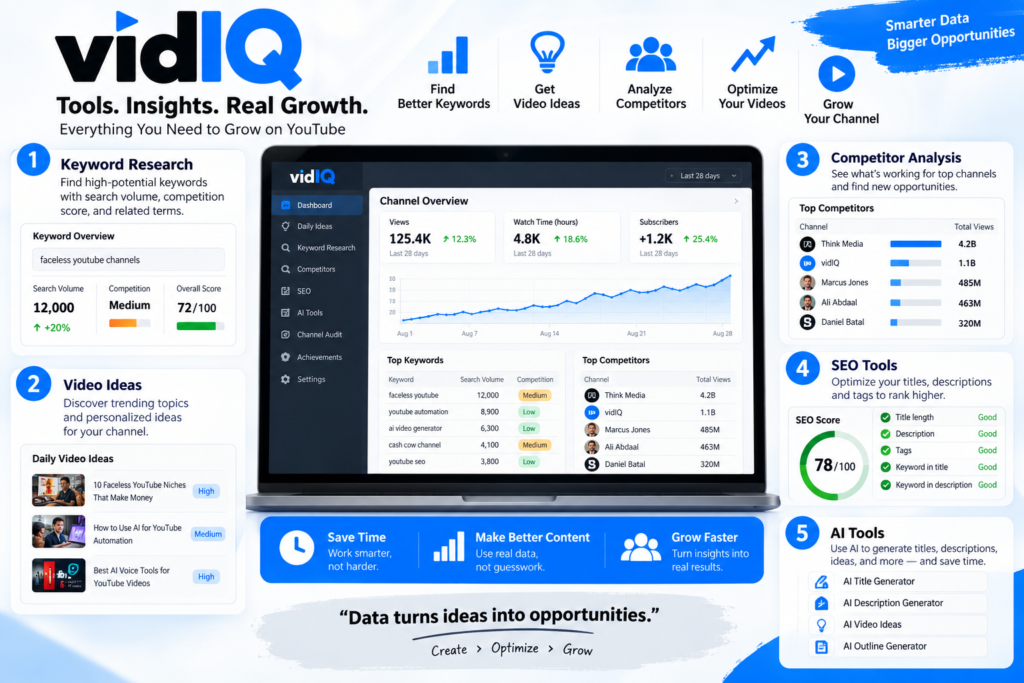
For creators deciding whether vidIQ is worth it, much of the platform’s practical value comes from its research, keyword, competitor analysis, and tracking features. Its AI tools can complement that workflow, but they should not replace a creator’s own judgment, content strategy, or understanding of their audience.
What Is vidIQ?
vidIQ is a YouTube growth and optimization platform that provides faceless YouTubers with tools to research keywords and optimize videos. The platform’s toolkit includes YouTube data and AI-powered functionality that enables idea generation, titles and more in-depth channel analysis.
One advantage of vidIQ is that it combines several tools within one workflow. This can reduce the need to rely on multiple programs for research and optimization.
vidIQ Review 2026: Key Features and SEO Tools
vidIQ’s keyword research tools help creators evaluate potential topics using metrics such as estimated search volume and competition. They can also surface related keyword ideas, making it easier to explore more specific search terms and compare potential topics before creating a video.
The critical skill involves analyzing the two core metrics together rather than separately. High search volume with a punishing competition score is a trap for a channel under roughly 10,000 subscribers — the impressions exist, but the slots are occupied by authority channels. Modest volume paired with a low competition score is where small channels win, because the algorithm has fewer strong candidates to serve. That is the entire arbitrage that makes YouTube keyword research software worth a line item.
vidIQ also includes tracking and analytics for channels and videos over time. By linking this to keyword research it’s possible to get a better understanding of content performance and identify trends and areas for future development.
Power User Tip: Run keyword checks before scripting, not after uploading. Tags added retroactively rarely rescue a video built on a phrase nobody searches.
Want to Build a Smarter Faceless YouTube Workflow?
Get the free Faceless YouTube Automation Guide and learn how to build a more efficient content workflow — from niche and topic research to content creation, optimization, publishing, and channel growth. It’s a practical resource for creators who want to use AI and automation more effectively without relying on a single tool.
See How vidIQ Works in Practice
Before exploring vidIQ’s AI features in more detail, watch the video below for a closer look at the platform in action. It provides useful context for understanding how vidIQ fits into a YouTube creator’s research and optimization workflow.
The AI Pivot: Useful Innovation or Feature Bloat?
The YouTube workflow can be managed using a number of different AI-powered tools available on vidIQ. Each of the tools are designed to perform specific tasks, so it will be possible to judge their relevance to you, your channel and your requirements. Also, covered will be the areas where human review is still required.
- AI Coach / Daily Ideas — Hype: an on-demand strategist. Reality: directionally useful for creators who have run dry, but suggestions skew toward formats already saturated in your niche, because that’s what the training signal rewards. Treat it as a brainstorming warm-up, not a content calendar.
- AI-generated titles — Hype: instant click-through optimization. Reality: serviceable syntax, generic hooks. The output clusters around the same four or five templates, which is precisely the opposite of what a crowded search page needs.
- AI descriptions and tags — Hype: SEO on autopilot. Reality: the weakest tier. Descriptions read as padded keyword stuffing, and YouTube’s ranking systems have spent years discounting exactly that pattern.
- AI thumbnail generation — Hype: skip the designer. Reality: fine for a placeholder, rarely publishable. Faces and text rendering remain inconsistent.
- Trend and outlier detection — Hype: predictive intelligence. Reality: the most defensible of the group, because it is fundamentally data retrieval wearing an AI label.
This pattern is consistent, leading the independent assessment cited above to conclude: most of vidIQ’s ‘AI features’ look exciting on the surface… but in reality, they’re not very useful. Automation that reads your own analytics earns its place. Automation that writes your copy mostly creates editing work.
vidIQ Review 2026: Credits and Hidden Costs
One important factor in this vidIQ Review 2026 is how the platform’s credit system can affect the real cost of using its AI features.
This often surprises subscribers. The generative tools do not run on an unlimited tap — they draw from a monthly credit pool attached to your plan tier, and different actions consume radically different amounts. Understanding the burn rate before you subscribe is the difference between a tool that scales with you and a paywall you hit on the 12th of every month.
| Task type | Relative credit cost | Monthly limit impact |
|---|---|---|
| Keyword lookups and competition scores | None / negligible | No practical ceiling for most workflows |
| Title and tag suggestions | Low | Dozens of runs before it registers |
| Long-form description or script drafts | Moderate | Noticeable for daily publishers |
| AI thumbnail and image generation | High | The single fastest way to drain a pool |
| Bulk or batch AI operations | Highest | Can exhaust an allocation in one session |
There are two key mechanics that make more of a difference than the actual numbers. First, Generation is charged per attempt (not per successful generated result), so re-generating the same thumbnail that wasn’t good enough the first time will cost just as much as the first generation. Second, most plans use a “use it or lose it” basis for pooled credits that do not roll over from month to month. So, any unused Generation credits are forfeited at the end of the month, while overages require an immediate upgrade to your plan.
For a channel publishing once or twice a week, credits are a non-issue. For a daily publisher or an agency running several channels from one seat, they become the actual constraint on which plan you need. Check the current allocations on the vidIQ pricing breakdown before committing.
vidIQ Pricing: Which Plan Offers the Best ROI?
For this vidIQ Review 2026, pricing matters most when you compare the cost of each plan with the features you will actually use. The tier structure is predictable, and the point of diminishing returns arrives earlier than the upgrade prompts suggest.
Free — Best for: validating the habit. The browser extension is the hidden value here. Even without a paid seat, you get competitor stats overlaid directly on watch pages and search results, which is enough to confirm whether you’ll actually use this data or just admire it. Most creators should live here for their first month.
Pro / mid-tier — Best for: solo creators publishing weekly. This is the ROI sweet spot. You unlock deeper keyword result sets, meaningful competitor tracking slots, and enough historical context to make publishing decisions with evidence instead of instinct. For a channel monetizing through ads, sponsorships, or a product, a single correctly chosen keyword recovers the subscription cost.
Boost / Max — Best for: multi-channel operators and teams. The jump is justified by seat count, channel slots, coaching access, and the larger credit allocation — not by additional keyword depth. If you manage one channel, the incremental data you gain here is thin. If you manage five, the per-channel economics flip immediately.
On billing: annual commitments offer a standard discount compared to month-to-month plans, but only take it after you’ve run a full quarter on a monthly plan. Paying twelve months upfront for a workflow you abandon in week three is the most common way creators waste money on this category. Current figures live on the vidIQ pricing page.
vidIQ Pros: Key Benefits for YouTube Creators
The strengths are narrow but deep, and they cluster almost entirely around data rather than generation.
- ✅ Real-time competitive analysis. Load any competitor’s channel and you see upload cadence, view velocity, and which videos are outperforming their own baseline. That last metric — outlier detection against a channel’s own average — is the closest thing to a growth cheat code in the suite, because it isolates format wins from subscriber-count advantages.
- ✅ The browser extension. On-page SEO data appears where you already work: search results, watch pages, and your own upload screen. No context switching, no separate dashboard to remember to open. Friction is the reason most analytics tools go unused, and this removes it.
- ✅ Progress tracking. vidIQ helps creators monitor video and channel performance over time, making it easier to evaluate how content changes affect results.
- ✅ Tracking that answers “did that change work?” Progress tracking converts publishing from a slot-machine ritual into a testable loop.
The Cons: Flaws and Frustrations to Consider
No tool with this much surface area ships clean. Four issues come up repeatedly across vidiq reviews, and any one of them can be a dealbreaker depending on how you work.
- The dashboard has a genuine learning curve. The advanced analytics view throws a dozen metrics at you simultaneously with minimal guidance on which ones drive decisions. New creators frequently optimize toward the wrong number for months. Budget a few hours of deliberate exploration, or you’ll pay for depth you never touch.
- Persistent upselling in the free and lower tiers. Locked panels, upgrade modals, and greyed-out features are woven through the interface. It’s a legitimate business model, but it makes the free tier feel like a demo rather than a product, and it interrupts workflows at exactly the wrong moments.
- Trend alerts are inconsistent. The AI-driven trend notifications fire on signals that sometimes reflect a genuine niche shift and sometimes reflect noise from a single viral outlier. Without the judgment to tell those apart, chasing alerts will scatter your content strategy.
- Extension performance on modest hardware. The browser extension injects a meaningful amount of data into every YouTube page you load. On older laptops or machines already running twenty tabs, search pages get noticeably sluggish. Creators on constrained hardware often end up toggling it off — which quietly eliminates one of the strongest reasons to subscribe.
vidIQ Review 2026: Final Verdict
The verdict holds: this is a research platform with an AI layer bolted on, priced as though the AI layer were the product. Buy it for the former and you’ll get your money back. Buy it for the latter and you’ll be disappointed by month two.
Who it’s for:
- Creators treating a channel as a revenue asset, where a single well-chosen keyword changes quarterly income.
- Data-driven operators who want competitive intelligence before scripting, not post-mortems after publishing.
- Agencies and multi-channel managers who need consistent tracking across accounts.
- Small business owners with video assets who must justify software spend against measurable pipeline.
Who should skip it:
- Hobbyists posting occasionally for fun — the free extension covers you entirely.
- Creators in niches so specific that search volume is negligible and discovery runs on community, not query.
- Anyone hoping a subscription will write, design, and think on their behalf.
If you’re building a broader automation stack, the right architecture puts vidIQ at the research layer — keyword validation and competitive signal — and leaves scripting, editing, and thumbnail design to specialized tools or humans. YouTube SEO heading into 2026 still rewards specificity, originality, and formats matched to genuine demand. The platform’s job is to tell you where that demand sits. The anxiety of a stagnant channel doesn’t disappear just by purchasing software; it dissolves when guessing gets replaced by evidence.
Key Takeaways for YouTube Growth
The condensed version: The key takeaway from this vidIQ Review 2026 is that the platform delivers the most value when creators use its research, keyword, and competitive analysis tools strategically.
Keyword research is the whole reason to pay. Search volume weighed against competition score is the single mechanism that moves a small channel into visibility. Everything else in the suite is supporting cast. If you cancel every feature except the Keyword Inspector and Video Progress Tracking, the subscription still pays for itself.
Do not buy this for the AI. Generative titles, descriptions, and thumbnails produce output that needs rewriting, and rewriting is the work you were trying to skip. The AI tools that genuinely help are the ones interpreting your existing data — outlier detection, velocity comparisons — not the ones producing new copy.
Credits are the real ceiling, not features. Image and long-form generation drain an allocation fastest, credits generally don’t roll over, and daily publishers will feel the limit before casual creators notice it exists. Model your monthly burn against the plan you’re considering before you commit to annual billing.
Competitive tracking is the quiet advantage. Knowing which of a rival’s videos beat their own average — and why — is more actionable than any keyword list, because it shows you a format that already works in your niche with proof attached.
Start free. Upgrade on evidence. Run the browser extension for free for a month. If you check the data before every upload, then you can justify the paid tier of your chosen plan. Otherwise, no plan tier will make a difference.
Ready to Try vidIQ?
If you want to explore vidIQ’s keyword research, competitor analysis, channel tracking, and AI-powered tools for yourself, you can start with vidIQ and see how well it fits your YouTube workflow.
[Try vidIQ Here →]