

A strong YouTube video script is more than an outline of what you want to say.
CONTENTS
- What Makes a YouTube Video Script Effective?
- The Script Must Match the Viewer’s Search Intent
- Common YouTube Video Script Mistakes That Reduce Viewer Retention
- Starting With a Long Introduction
- Letting AI Repeat the Same Point
- Writing for Reading Instead of Listening
- Adding a Call to Action Before Delivering Value
- How to Improve a YouTube Video Script Before Recording
- Tighten the Hook
- Improve the Flow Between Script Sections
- Remove Repetition Before Recording
- Read the Draft Aloud Before Production
- How AI Improves a YouTube Video Script
- Build a YouTube Video Script Outline First
- Turn the Outline Into a Focused Script
- Where TubeMagic Fits Into the Writing Process
- Who Should Use AI for Scriptwriting?
- When AI-Assisted Writing Makes Sense
- When Human Research Matters More
- Frequently Asked Questions About YouTube Scripts
- How Long Should a YouTube Video Script Be?
- Can AI Write an Entire Script?
- What Should a YouTube Video Script Opening Include?
- How Can a YouTube Video Script Improve Viewer Retention?
- Should Every Video Include a Call to Action?
- Create a YouTube Video Script That Sounds Natural
The script should give viewers a reason to keep watching. It should hold their attention from the opening to the final call to action.
For faceless channels, the script is even more important. Since there is no human presence, no facial expressions, the script is all there is.
When creating a YouTube script fast with AI, the content needs to be thought through as well. A good script consists of a clear message, a hook, a clear structure and transitions between the sections to stay on track and to keep the viewer interested.
This guide to writing YouTube videos will help you to use AI for the writing of your script.
.In this guide you will learn how to write a great YouTube video script. The script will be organized in sections to create the best possible content. You will also learn how to improve viewer retention and sound very natural in your video. The guide also explains how to transform your AI-assisted drafts into clear and engaging content.
What Makes a YouTube Video Script Effective?
An effective script for a video keeps the viewer on track with the main promise of the video and delivers on that promise. A script sets viewer’s expectations as to what they will learn, be helped with or achieve by watching the video. The rest of the video then stays on track and does not go off on tangents.
Strong video scripts usually contain four key elements. Each one helps keep the video clear and useful for the audience.
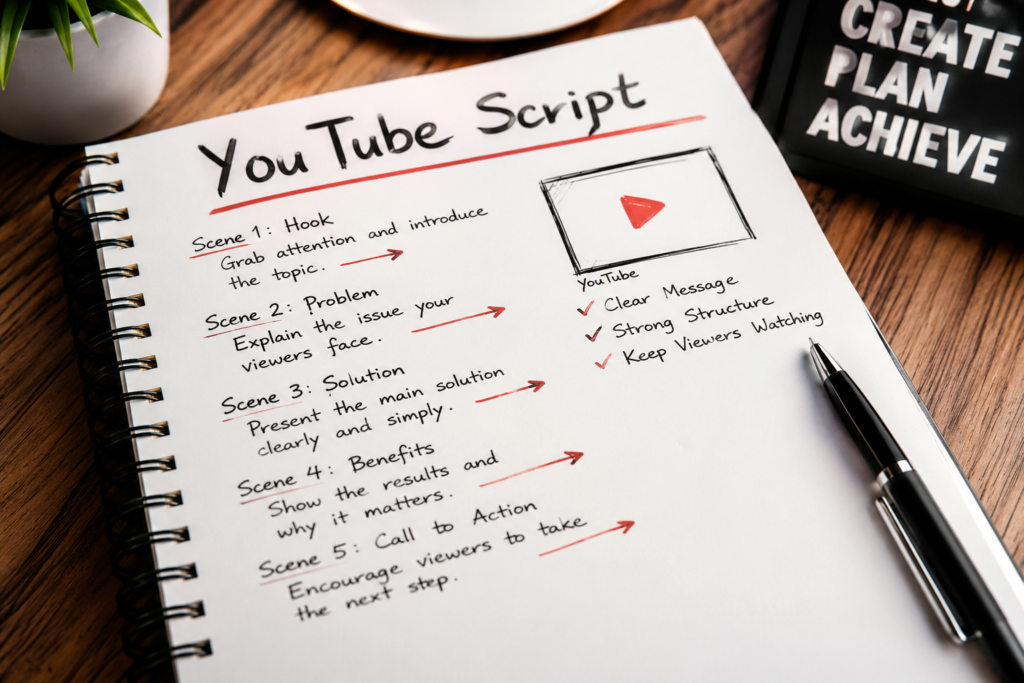
First, use a strong hook to grab attention. Next, introduce the video and confirm what viewers can expect. Then, organize the main body around clear key points. Finally, end with a conclusion that guides viewers toward the next step.
The script also works as a blueprint for production. Each section helps the editor match narration with the right visuals. These may include screen recordings, footage, graphics, examples, or text overlays.
The Script Must Match the Viewer’s Search Intent
Before you start writing the opening line of your video, you have to work out why viewers would choose to watch it. Tutorial videos are intended to show viewers how to do something step by step. Therefore they need to be led through the process. Comparison videos need to show the real differences between things. Case studies need to provide evidence, context and lessons learned.
Even when all information that the presenter knows is correct and presented to the viewer, he can leave the script because the information is presented in an wrong way. The script is not intended to allow the viewer to learn everything the presenter knows. It is intended to provide the viewer with information in the expected order.
Common YouTube Video Script Mistakes That Reduce Viewer Retention
AI can generate weak scripts in seconds. Many creators then turn those drafts into videos without improving them first.
. The majority of these videos suffer from a few key problems. For starters, the language is often far too familiar. The primary value of the video is delivered far too late in the video. And much of the content is irrelevant and doesn’t add value to the main promise of the video that’s being read out from the script.
Before you can put your voice to the video, check your script for these deadly mistakes.
Starting With a Long Introduction
Your viewers don’t need an introduction to your channel, to your creator, or to the in-depth history of a topic related to your video. They clicked on your video title and thumbnail because it promised them a very specific result.
You start with the problem of your viewer, the outcome they can expect from watching your video, or even the question that was leading to this video in the first place. Then you confirm what they are going to learn about in more detail, without having to rephrase the title of your video word for word.
Letting AI Repeat the Same Point
AI scripts repeatedly explain the same key point to a view in different words. As a result, such videos are typically slower and less valuable per minute than alternatives.
The AI created a rough draft that could be improved greatly. The video was too slow because the script repeated out the same points using different wording. By cutting out the duplicate content and making sure every sentence, or section, contains new information such as a new detail, example, step, or transition, I could make a much better video in less time than it would take me to write out a long script filled with duplicate information.
Writing for Reading Instead of Listening
A sentence may look natural on a page but sound awkward when spoken aloud. Long sentences, formal transitions, and complex wording can make the narration difficult to follow.
Read the script aloud before production. Shorten sentences that require extra breath, replace formal language with conversational wording, and make sure each paragraph communicates one main idea.
Adding a Call to Action Before Delivering Value
Try to avoid asking for viewers to subscribe, to download a guide, or to check out a product or service too early in your video. Deliver value first and asking for a call to action too early can undermine the rest of the video and the viewers’ trust of you.
Your main call to action should come after the main insight, at the end of a step or after results have been achieved. Only then will it make sense to refer viewers back to downloading a guide or viewing a product etc. as it relates to their goals.
How to Improve a YouTube Video Script Before Recording
Your first draft of your script is not your final version! Go through your script to check for such things as clarity, pacing and the main promise of your video. Remove any parts that could hinder your viewer and that do not link to other parts of your video.
Start with the opening. Check whether it grabs attention and clearly explains what viewers can expect. Then review each section and make sure it adds something new. Remove anything that simply repeats an earlier point.
Read the entire script from start to finish and be surprised at the amount of out of place words, too long words and poor worded transitions found between sections of your YouTube video script. The words on the page of your YouTube video script should read very smoothly when read aloud.
Tighten the Hook
If the background information is too much, cut it and make your hook more direct. What is the hook in your video meant to do for the viewer? Create curiosity? Present a problem that needs to be solved? Paint a picture of what they will get from watching your video?
A poor Hook can be a disaster if it explains too much of the content and a great Hook gives the viewer a reason to watch the next section of content.
Improve the Flow Between Script Sections
Each section in your script should flow to the next section. If you have to jump around to different parts of your script to different topics in your video, then your video can end up feeling really disjointed or very confusing for your audience and make it harder for them to follow what your main point is trying to get across.
Use short transitions between sections. Explain why you are moving to the next point before introducing it. This keeps the video easier to follow.
A clear YouTube video script should read as a single, coherent explanation, rather than a set of separate paragraphs.
Remove Repetition Before Recording
I also experimented with the goal of making the script feel even slower than it already is. To that end, I attempted to include repetition in the YouTube video script. The AI generated a first draft of the script for a given prompt. This first draft restates the main message of the video in different words. This could be due to the prompt for the script being too broad, or the requested length of the script being too long.
Review each section of your YouTube video script. Remove sentences that add no new information, examples, or useful context.
Ultimately the end of each paragraph should have led the reader to the conclusion stated at the beginning of the video title.
Tighten the script to improve pacing. A focused script also delivers value to viewers faster.
Note that making the scripts shorter is not the objective, rather making sure each line of the script has a point.
Read the Draft Aloud Before Production
Reading your YouTube video script aloud is one of the fastest ways to find awkward sentences, unnatural transitions, and sections that feel too long. Words that look clear on the page may sound stiff or confusing when spoken.
Read your YouTube video script and mark off the sentences that will be hard to read or understand. Shorten the long sentences and change any formal language to natural speech. Add pauses to your script. Leave space between the main points of your video.
This last check makes the YouTube video script sound more like a conversation, which makes it easier to record the voice-over, no matter if it’s a real person or a computer voice doing the talking.
How AI Improves a YouTube Video Script
AI can reduce the time required to research, outline, and draft a YouTube video script, but it works best when the creator provides clear direction. A vague prompt usually produces generic advice, repeated ideas, and an opening that sounds similar to hundreds of other videos.
First, give the AI the topic, audience, desired outcome, tone, and target length.
Then, tell the AI what the viewer already knows about the topic and what he/she should know after watching the finished YouTube video script.
AI can organize research, suggest hooks, and create an outline. However, you should still review every draft. Check the facts, remove repetition, and make the narration sound natural.
AI can speed up scriptwriting, but the script still needs to fit into a wider production process. This faceless YouTube system shows how research, scripting, voice-over, editing, and publishing work together.
Build a YouTube Video Script Outline First
Don’t have AI write your entire YouTube video script from start to finish. Instead, create an outline for your script including: the hook, the main sections, examples within sections, transitions between sections and a conclusion.
Organize the outline to the YouTube video script before finishing it. Remove items that don’t support the promise of the video and reorganize the remaining items to present them in the most effective order.
Turn the Outline Into a Focused Script
Write your YouTube video script one section at a time. This gives you more control over the depth, tone, and purpose of each section.
Remove items from the generated sections in the outline to keep focused on the main topic and to deliver the main value to the viewer fast. The result is a very short YouTube video script that answers the question of the viewer.
Where TubeMagic Fits Into the Writing Process
TubeMagic is meant for the beginning of your YouTube video script. It can help you organize your ideas, do research for new video topics, and more. This is especially helpful for a faceless channel owner who makes videos for a living and needs a constant supply of new scripts. TubeMagic helps take the first step (beginning from scratch) out of writing a script for you.
The generated script is not ready to publish yet. Check the facts first. Add stronger examples, improve the flow, and adjust the wording to match the channel’s style and audience.
TubeMagic is most useful when creators struggle to produce content consistently or organize their ideas into a clear structure.
TubeMagic is less useful when the biggest problem for the creator is to do the research for a solid process, to find a good scriptwriter for specialized content or to come up with very specific formats that require a lot of original reporting.
Who Should Use AI for Scriptwriting?
AI for generating YouTube video scripts can be very powerful for faceless YouTube channels, solo YouTube creators and small YouTube teams of people. The tool can be of great value to them as they try to release more videos on a regular basis and not spend too much time on the first draft of the script.
Many creators understand their topic well but struggle to organize it into a clear YouTube video script.
This is where AI can add so much value by providing a framework to which the creator can then add their own judgment, examples, etc. and their full editorial voice.
When AI-Assisted Writing Makes Sense
Treat the AI-generated script as a draft. Verify the facts, improve the wording, and edit it before recording.
This script is suitable for YouTubers who want to create content on a regular basis and it’s very suitable for ‘shelf life’ content, like tutorials, educational explainers, comparisons and list videos of all kinds.
When Human Research Matters More
A YouTube video script generated by AI is not a shortcut for creators who plan to use the script as is after the first review. For investigative reports, personal stories, expert analysis and sensitive topics that consist largely of original research and personal experience, AI is not appropriate.
Frequently Asked Questions About YouTube Scripts
How Long Should a YouTube Video Script Be?
The ideal length of a YouTube video script depends on the speaking pace and target video duration. A conversational voice-over commonly delivers approximately 130 to 160 words per minute, but clarity and pacing matter more than reaching a fixed word count.
Can AI Write an Entire Script?
AI can create an entire YouTube video script, but the first output should be treated as a draft. Review its facts, remove repeated ideas, strengthen the hook, and rewrite any section that sounds generic or unnatural.
What Should a YouTube Video Script Opening Include?
The opening of a YouTube video script should identify the viewer’s problem, establish the expected outcome, and create a reason to continue watching. It should avoid long introductions and deliver the central promise quickly.
How Can a YouTube Video Script Improve Viewer Retention?
A YouTube video script can improve retention by maintaining clear progression, using specific examples, removing unnecessary information, and creating transitions that encourage viewers to continue to the next section.
Should Every Video Include a Call to Action?
Most videos benefit from a relevant call to action, but it should match the purpose of the YouTube video script. The request should appear after useful information has been delivered and should lead viewers toward a logical next step.
Create a YouTube Video Script That Sounds Natural
YouTube video scripts are most effective when they set up a promise to the viewer and then deliver on that in the body of the video and the conclusion. Initially doing research, an outline and a first version of a script fast and good, however deciding on the most important points for a video and conveying them in a natural and adequate way not.
Use AI to create the basic outline of your content, and then go through and improve your YouTube video script. Remove repetition, strengthen up the transitions between topics, verify facts, and then read through your completed script out loud. This will be quick and effective, and much better than allowing the AI to write the content for you.
The objective is not to publish more words. It is to create a YouTube video script that holds attention, supports the visuals, and gives the viewer a clear reason to continue watching

