Kinsta vs WP Engine is an important comparison for businesses, publishers, and independent creators looking for managed WordPress hosting. for businesses, publishers, and independent creators. For US site owners, the choice is about more than the monthly bill: plan limits, day-to-day tools, and access to support all shape the experience. The right fit depends on your budget, traffic, site requirements, and the help you expect when a problem arises.
CONTENTS
- Key Takeaways
- Kinsta vs WP Engine: How Do Prices Compare?
- Kinsta vs WP Engine: Entry-Level Plans and Pricing
- Add-ons, overages, and annual cost
- Which Host Delivers Better Performance and Infrastructure?
- Want a Closer Look at Kinsta Pricing?
- Free WordPress Hosting Guide
- What the available performance measurements show
- Cloud platform, containers, and CDN reach
- Which Features Make Development Easier?
- Staging environments and plan resources
- Updates, access, and developer workflow
- How Do Backups and Security Compare?
- Retention, restore points, and paid backup frequency
- Security features to verify by plan
- How Easy Is It to Migrate a WordPress Site?
- Free migrations and migration limits
- What the migration service covers
- Which Provider Offers the Support You Need?
- Which Plans Fit Freelancers and Agencies?
- Managing several client sites
- When enterprise resources make sense
- What Is WP Engine’s Current WordPress.org Status?
- Access to WordPress.org
- The legal dispute and what it means for buyers
- Which Host Should You Choose for Your Site?
- A practical fit for a freelancer or blogger
- A practical fit for a growing business or agency
- Conclusion
- FAQ
- How much does WP Engine hosting cost?
- Do Kinsta and WP Engine offer monthly billing?
- Does Kinsta offer free migrations?
- Which host has better performance?
- What support does each provider offer?
- How should I compare backup options?
- Which provider should I choose?
Both providers offer managed WordPress services, but their plans and features are not identical. This comparison looks at practical differences, including pricing, performance, migrations, backups, and developer workflows, without treating benchmark results as a promise for every site. A staging environment is a separate copy of a live site where you can test changes before publishing them. Infrastructure details, including Google Cloud, are worth checking when they matter to your project.
Kinsta may suit owners whose priorities align with its migration options and available plans. WP Engine may fit teams whose preferred workflow or support needs match its offerings. Neither host is automatically the better choice for every website. As you compare them, consider how your team handles updates and testing, whether you need phone support, and which resources your site actually uses. The goal is to choose a plan for your real workload—not simply the longest feature list.
Key Takeaways
- Match each plan’s visit allowance and storage to your actual site use.
- Compare billing terms, renewal costs, and overage rates—not just headline prices.
- Treat performance benchmarks as results from specific tests, not guarantees.
- Verify staging, backup, and update features for the plan you need.
- Compare migration options and support channels before choosing a provider.
- Select a plan that fits your needs without paying for unused capacity.
Kinsta vs WP Engine: How Do Prices Compare?
Kinsta vs WP Engine pricing: when you compare hosting providers, it’s important to remember that the monthly price is only part of the overall cost of the hosting. Kinsta’s Launch plan is $35/month with monthly billing, for a single WordPress install, 75,000 visits per month, and 15GB of storage, for example. However, monthly billing will likely carry a premium, and the renewal cost could be higher than the promotional price offered with annual billing. WP Engine’s Essential plan has different pricing for various configurations of servers and resources. The cheapest option is 25,000 visits per month and 10GB of storage, but you will need to compare the included resources with the Kinsta plan above, as well as the billing terms and other features that are important to you and your site, to get the real value of each hosting provider.
When comparing the cost of hosting a website, it is important to calculate the total cost of the hosting as opposed to the advertised monthly price. The Kinsta Launch plan is advertised as $35/month with monthly billing totalling $420 over a 12 month period. However, prices may reduce with annual billing and with available discounts or promotions. WP Engine Essential costs vary depending on the configuration chosen and the billing cycle, and prices may drop when purchasing on an annual basis, as well as with available promotions.
It is also important to calculate the total cost of the annual price of a plan and take into account the cost of any additional storage required, any potential traffic overages, and the cost of any optional services. An introductory offer that is cheap in the short term may not offer the best value in the long term as a website grows in size and requires more resources.
Kinsta vs WP Engine: Entry-Level Plans and Pricing
Ready to Explore Kinsta?
Kinsta may be worth considering if you prioritize managed WordPress hosting, migration assistance, and resources that support your website’s growth.
Explore Kinsta Plans and Pricing
Kinsta Launch and WP Engine Essential are two of the entry-level managed WordPress hosting plans offered by Kinsta and WP Engine respectively. The first lists one WordPress installation, 75,000 estimated visits per month and 15GB of storage. WP Engine Essential’s most basic configuration includes one website, 25,000 visits per month and 10GB of storage. Kinsta Launch therefore offers more scope for growing websites. But WP Engine might be the more cost effective option for users who place a high value on its development tools, support options and more specific hosting features.
Visits are not the same as bandwidth, and providers may measure or handle traffic differently. Use the table as a starting point, then confirm the live US rate, resource limits, and billing terms directly with each provider. Compare like with like: monthly billing against monthly billing, and annual billing against annual billing.
| Hosting Plan | Monthly Billing | Annual Billing | Monthly Visits | Storage |
|---|---|---|---|---|
| Kinsta Launch | $35/month | Check current annual offer | 75,000 | 15GB |
| WP Engine Essential | Varies by configuration | From $28/month, billed annually* | 25,000 | 10GB |
WP Engine’s starting annual rate may be promotional. Confirm the final price and renewal terms at checkout.
Add-ons, overages, and annual cost
WP Engine’s Essential plan and Kinsta’s Launch plan provide a useful entry-level comparison, but they may not fit every site. Review the official US pricing pages for current configurations, add-ons, and resource definitions. Older comparison articles can mix regional pricing, retired plans, or annual rates presented as monthly prices. Kinsta offers additional plans and services; WP Engine offers its own plan options and tools. Compare the actual features you need rather than assuming the entry price covers every workflow.
Include any extra sites, storage, staging environments, or paid services in your budget. A team managing client sites, for example, should calculate the annual cost for all required installs and tools—not simply multiply the entry-level price. Also account for management needs such as additional access, development environments, and backups if they are billed separately. Free migrations can reduce setup costs, but check eligibility and transfer limits before counting a Kinsta offer or any WP Engine migration assistance as included.
Next, check what happens when traffic exceeds the plan allowance. Confirm whether the host charges overages, recommends an upgrade, or applies other limits, and how it defines a billable visit. A traffic estimate is useful for planning, but it does not mean both providers will count every visit in the same way. If your site has seasonal traffic spikes, model the cost of a busy month as well as a typical one.
Kinsta lists visit overage details on its official pricing page. Check the current rate and terms there before adding an overage estimate to your budget. For WP Engine, confirm excess-traffic charges or limits in the current plan information or checkout rather than relying on third-party figures. Storage, traffic, and visit limits affect the cost of hosting, but they do not alone predict performance. CDN delivery from an edge location, caching, and Google Cloud Platform infrastructure are separate considerations; confirm each provider’s current details if they matter to your site.
For a realistic annual comparison, use the same assumptions for both providers: billing term, number of sites, storage, expected traffic, and required add-ons. Add the renewal rate and likely overages, then compare that total with the resources and support included. This is more useful than choosing a host based on one monthly number. It also makes the difference between the Kinsta and WP Engine plans clearer for a small business, blogger, or agency.
When choosing a hosting service, it’s best to compare the total price of the service, the amount of storage needed, the amount of traffic that will be generated, and the features included in the service. Kinsta Launch plan includes 15GB of storage space and 75,000 estimated visits per month to a single WordPress website. In comparison, the entry-level WP Engine Essential plan includes 10GB of storage space for a single WordPress website and 25,000 visits per month to the website. In addition to the different levels of resources, there are also different sets of tools and support provided. Kinsta may be the better option for highly trafficked websites, but WP Engine has certain development tools and customer service features that may be very important to some users. It is best to look at the specifics of what your site will need and what the plan will really cost after renewal.
Which Host Delivers Better Performance and Infrastructure?
In a 2025 comparison, HostingStep reported a lower time to first byte (TTFB) for WP Engine, a higher WPBench score for Kinsta, and identical monitored uptime for both hosts. Those results differ by measure, so they do not establish one overall performance winner in a Kinsta–WP Engine comparison.
These third-party results describe a specific test, not a guarantee about your site. Hosting performance also depends on site configuration, visitor location, caching, and server workload. Neither a benchmark nor a performance-monitoring result predicts exactly how a site will respond to your traffic.
Want a Closer Look at Kinsta Pricing?
Before choosing between Kinsta and WP Engine, it helps to understand what you’re actually paying for. Kinsta offers different hosting plans with varying resources and features, so the best option depends on your website’s needs and budget. For a more detailed breakdown of available plans, potential additional costs, and overall value, read our Kinsta Pricing 2026 Guide.
Free WordPress Hosting Guide
Choosing the right WordPress hosting can be confusing, especially when comparing pricing, performance, security, and features. Our free WordPress Hosting Guide helps you understand the key factors to consider, avoid common hosting mistakes, and make a more informed decision for your website.
Get Your Free WordPress Hosting Guide Below!
What the available performance measurements show
HostingStep’s 2025 test covered 34 WordPress hosts. It reported TTFB of 367 milliseconds for WP Engine and 444 milliseconds for Kinsta. TTFB measures how long a server takes to begin responding; it is not a measure of the complete page load or the time every visitor will experience.
In the same test, WP Engine scored about 8.0 out of 10 on WPBench, while Kinsta scored about 8.5. HostingStep recorded 100% uptime for both during its 365-day monitoring period. These figures apply to that test and monitoring period. They are not a future uptime promise, a contractual SLA, or a guarantee for all sites. The reported results do not, by themselves, establish which host is faster for your WordPress site.
| Performance Metric | WP Engine | Kinsta |
|---|---|---|
| TTFB (2025) | 367ms | 444ms |
| WPBench Score (2025) | About 8.0/10 | About 8.5/10 |
| Monitored Uptime (365 Days) | 100% | 100% |
Read each result separately: WP Engine had lower TTFB, Kinsta had the higher WPBench score, and uptime was equal in HostingStep’s measurement. Test location, WordPress setup, caching configuration, and monitoring methods can all affect results. Without matching those conditions to your own site, the numbers are useful context—not a prediction.
Cloud platform, containers, and CDN reach
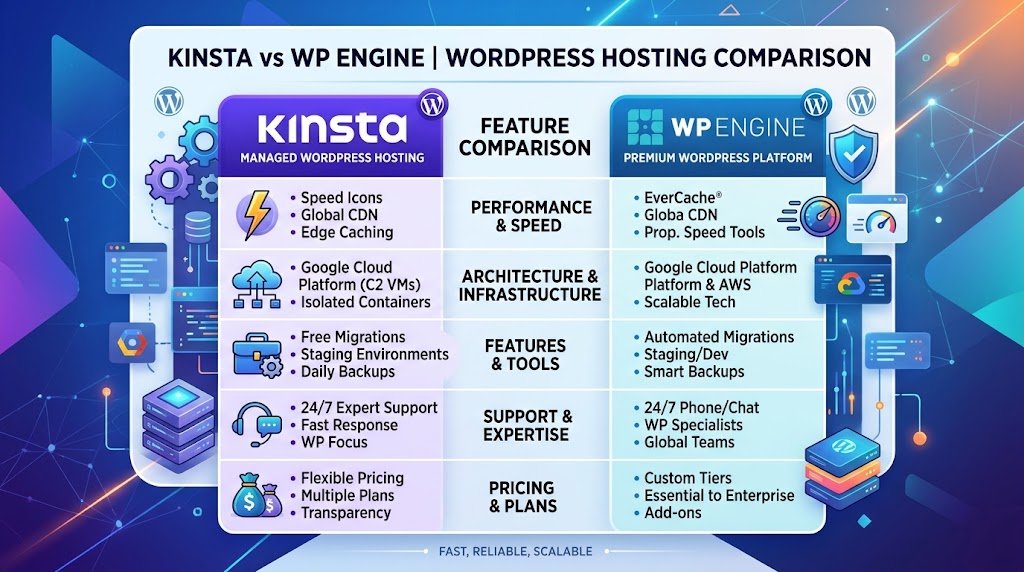
Kinsta says its WordPress sites run in isolated containers and identifies Google Cloud Platform as part of its infrastructure. Google Cloud provides the cloud platform, while containers isolate site resources. Check Kinsta’s current documentation for available Google Cloud data centers and global CDN coverage, since locations and edge services can change.
WP Engine describes CDN and caching features for its managed WordPress hosting. Confirm which CDN, caching controls, and plan features apply to the service you are considering. A global CDN can serve cached content from an edge location closer to a visitor. Dynamic requests, such as uncached pages, may still need to reach the site’s server, so CDN delivery is not a substitute for suitable hosting resources.
Third-party descriptions of WP Engine’s underlying cloud platform conflict. Do not assume that WP Engine uses Google Cloud or that it runs on a different cloud platform without reliable, current confirmation. If Google Cloud, a particular data center, or a security requirement matters to your project, check primary provider documentation before choosing.
For sites serving visitors across the US or internationally, CDN reach and caching configuration can affect page load times. But infrastructure labels alone do not show how a site will handle traffic spikes. The best setup depends on your audience, content, and technical requirements—not simply whether a provider mentions Google Cloud.
Use independent benchmark results as one input. Then compare each provider’s current infrastructure, caching options, CDN coverage, and support for your site’s needs. That approach gives a more useful view of Kinsta versus WP Engine than any single performance score.
Which Features Make Development Easier?
Staging and update tools help teams make WordPress changes more safely, but what each host includes depends on the plan. In a Kinsta vs WP Engine comparison, check how many staging environments you get, whether extra environments cost more, and which developer tools are included. More staging capacity can affect your bill, especially when your team works across several sites.
Confirm staging access and included tools for the exact plan you intend to buy. Plan names and feature bundles change, so older comparisons may not reflect what either provider offers now.
Staging environments and plan resources
A staging environment is a private copy of your site for testing updates, design changes, or new features before they go live. Kinsta provides staging environments, and WP Engine offers development and staging environments alongside production. Check the current plan terms for the number included, any resource limits, and the cost of additional environments. A solo owner may need one staging copy; agencies and larger teams may need separate spaces for client sites or parallel releases.
Staging is not a backup, and a test copy may not behave exactly like the live site. Resource allocation, caching, and edge settings can differ from production. Review each provider’s current terms before treating staging capacity, resource isolation, or an uptime SLA as a guaranteed feature of your plan.
| FeatureKinstaWP Engine | ||
| Staging and development environments | Staging available; confirm current plan limits and additional environment costs | Development and staging available; confirm current plan limits and additional environment costs |
| Plugin updates and visual regression testing | Check current tools and plan or add-on terms | Check current tools, availability, and license terms |
| Resource isolation | Review current plan details | Review current plan details |
| Uptime SLA | Review current plan terms | Review current plan terms |
Updates, access, and developer workflow
Compare automatic WordPress and PHP updates, SSL, SSH access, plugin-management tools, and visual regression testing by plan. These features can reduce routine work, but confirm what the host updates automatically and what your team must review before changes reach a live site.
For local development, map how work moves from a laptop to staging and then production. Check user access controls and whether the workflow fits your existing tools. Local development helps you work on changes before deployment, but it does not replace testing on the hosted site. Staging does not replace backups, either.
Multiple staging environments are useful for agencies managing client sites or separate release cycles, but they can add cost and management overhead. Check resource limits, including PHP worker capacity, which affects how many requests a site can process at once and may influence performance under load.
Before signing up, compare the staging environments, update features, access controls, and extra charges included with your managed WordPress plan. The best workflow is the one your team can use consistently—not simply the plan with the longest feature list.
How Do Backups and Security Compare?
Backup frequency and retention describe different parts of a recovery plan. Frequency tells you how often a provider creates a restore point; retention tells you how long it keeps those copies. Compare both details when deciding whether a Kinsta or WP Engine plan fits your recovery needs.
Daily backups do not tell you how many days of restore history are available. Check current plan documentation from both providers, since backup schedules, retention, and paid options can change.
Retention, restore points, and paid backup frequency
For each provider, confirm how often automatic backups run, how long they are retained, and whether you can create an on-demand backup before making a major change. Check how restores work and whether more frequent backups or longer retention cost extra. These details vary by plan, so include any additional fees in your hosting budget.
A site that changes several times a day has different recovery needs from a brochure site that rarely changes. An online store, for example, should ask how much order data could be lost if it has to restore from an earlier point. More frequent restore points reduce the gap between backups, but they do not replace a recovery plan. Consider where else critical data is stored and how your team would restore service after an incident.
Before adding a backup option to your annual estimate, verify its current price and billing basis. Check whether the charge applies per site, account, or plan, and whether the feature is already included in the tier you are considering.
Security features to verify by plan
Review the security features listed for your exact plan, including SSL certificates, SSH access, backup controls, and any security monitoring or support. Confirm what is included, optional, or limited by tier. A list of features is not, by itself, proof that a host meets a specific security standard.
Backups help protect a site’s data, but they do not prevent every attack. Secure passwords, appropriate access controls, software updates, and monitoring remain important. Check each provider’s documentation to understand the host’s responsibilities and what your team must manage. For WordPress hosting, also review how caching, plugins, and updates fit into your site’s security process.
Support availability and response time are separate matters. If an incident could interrupt sales or client work, confirm how to report an urgent issue and what assistance your plan includes.
Compare backup frequency, retention, restore options, security features, and support terms for the plans you are considering. Choose coverage that matches how often your site changes and how much recent data you can afford to lose.
How Easy Is It to Migrate a WordPress Site?
Migration help depends on the provider, plan, and site setup. Kinsta offers migration assistance, but eligibility, the number of transfers, and whether a transfer is free depend on its current terms. WP Engine provides migration tools and support options; check which method is available for the plan you are considering. Review the current terms before choosing a host or scheduling a move.
Compare the migration service, its limits, and the support included with your plan. “Free migrations” does not mean every site qualifies or that every transfer is handled by a migration team.
Free migrations and migration limits
Before relying on a Kinsta offer, confirm how many transfers are included and whether the service covers your site’s configuration. For WP Engine, check whether the relevant plan uses a self-service tool, hands-on assistance, or both. Migration terms and plan names change, so older comparisons may not reflect what either provider currently offers.
Ask whether you can schedule the migration, what information you must provide, and whether custom configurations require additional work. The right level of help depends on your setup and how much time your team can devote to the move.
What the migration service covers
Compare each provider’s migration process with your site’s actual requirements. Before arranging a transfer, confirm:
- How many installs the destination plan allows and how many migrations are included.
- Whether the transfer can be scheduled and whether downtime is expected.
- Whether multisite, Bedrock, Trellis, a reverse proxy, or WP Engine LargeFS is supported.
- Who handles the transfer and what information you need to provide.
Back up the site, transfer it, and review the copy in staging before changing DNS. Test key pages and functions after cutover, and monitor traffic to catch problems early. Describe any custom WordPress configuration to the provider in advance so the migration plan accounts for it.
Before the move, confirm the schedule, responsibilities, and any special requirements. A clear migration plan helps protect site data and limit disruption while you switch WordPress hosting providers.
Which Provider Offers the Support You Need?
If speaking with an agent matters, check which WP Engine plan includes phone support before comparing prices. Phone access depends on the plan, so do not assume every customer receives the same support options. Verify current entitlements on the provider’s official plan pages.
Compare Kinsta and WP Engine by support channel, availability, and plan terms. Both providers offer support for hosting customers, but the channels and eligibility can differ by tier and may change. Check whether chat or phone is included, along with the hours and any priority options.
For Kinsta, review the current support channels, language options, and availability for the plan you are considering. Confirm whether support handles technical questions about your site and hosting configuration. For WP Engine, check its plan details for phone access, priority handling, and other support options. WP Engine offers different plans, so use current information rather than an older comparison.
Phone support is useful when you need to explain a complicated issue in real time. Chat gives teams a written record they can share, which can help when several people are working on the same problem. Consider your working hours, the kind of issue you expect, and which channel your team will actually use. Do not choose a plan based on a channel you are unlikely to need.
Availability is not the same as a guaranteed response time. A support channel listed as available around the clock does not necessarily promise an immediate reply or a specific resolution time. Check each provider’s published terms for response targets, if any, and distinguish those targets from guaranteed service commitments.
It’s also important to confirm what issues the support team can assist with. When you’re talking about hosting support, it will typically cover questions about the hosting platform and service issues. But things like custom development, plugin debugging, and changes to a website are often outside of the scope of service for hosting support. If you need help with security issues or with a migration, it’s also important to review the terms of service for WP Engine and Kinsta to see how they will assist with these types of issues.
Choose the provider whose support channels suit your needs, then verify the exact entitlement for your plan. Compare phone support, chat, availability, and any priority options alongside price and resources. That makes support a practical part of the hosting decision, not just a feature on a plan list.
Which Plans Fit Freelancers and Agencies?
Freelancers and agencies should begin with a count of the WordPress installs they manage, then compare storage, traffic limits, and the cost of additional capacity. Read each plan’s definitions carefully: estimated visits and bandwidth measure different things, so they are not directly interchangeable.
Choose a plan that fits your site count, storage needs, and expected traffic. A higher tier is not automatically a better value if your team will not use its extra capacity or features.
Managing several client sites
Both Kinsta and WP Engine offer managed WordPress hosting for freelancers, small businesses and agencies with many websites. Instead of buying three small plans, we compare their options for multi-site hosting as well as storage, traffic, and management features. Agencies may particularly like Kinsta’s approach to centralizing all of their WordPress sites while WP Engine offers development tools and ways to collaborate with other in the team. We look at the two services and help you decide which is best for your needs, based on the size of your portfolio, your needs, and your overall budget for hosting.
| Feature | Kinsta | WP Engine |
|---|---|---|
| Multi-site Hosting | Available on eligible plans | Available on eligible plans |
| WordPress Management | MyKinsta Dashboard | WP Engine User Portal |
| Staging Environments | Available | Available |
| Website Migrations | Migration assistance available | Migration tools and assistance |
| Team Collaboration | User access and permissions | User access and permissions |
| Developer Tools | SSH, Git and staging tools | SSH, Git and staging tools |
| Best For | Agencies prioritizing managed migrations and centralized management | Agencies prioritizing development workflows and collaboration |
Beyond price, compare site management features, user access, and approval workflows. Agencies using local development or managing several projects at once should check whether the plan supports their staging environments and team processes. Kinsta and WP Engine have different management options, so weigh the tools against your actual workflow rather than assuming one host suits every agency.
Whether specific regional needs of your clients play a big role for you or not, you should pay attention to the infrastructure. When a project is built on Google Cloud or Google Cloud Platform and even on specific data centers, you should check the provider’s current documentation for the locations that are available to you. Google Cloud Platform alone is not enough to evaluate the performance of a website. Also, check the CDN’s edge locations and performance monitoring for your audience and the specific workload you have.
When enterprise resources make sense
Enterprise managed hosting makes sense when a portfolio requires custom resources, higher capacity, or contractual service commitments. Confirm current pricing, site limits, support, and any uptime SLA before budgeting. Review licensing for included frameworks or themes as well. These features should not replace a comparison of storage, traffic, access, and team needs.
Allow for client growth, but choose a larger managed WordPress hosting plan only when its capacity and management features match your workload.
What Is WP Engine’s Current WordPress.org Status?
A court order restored WP Engine’s access to WordPress.org and its functionality on December 10, 2024. That restoration addressed access; it did not settle the broader legal dispute.
The order restored access for WP Engine, its customers, and users, but it did not resolve every claim in the case. Keep the service update separate from the litigation when assessing this host.
Access to WordPress.org
In 2024, WP Engine reported that access to update plugins and themes had been blocked and that they had found a way to work around the issue. However, the court order was subsequently lifted. This means that access to WordPress.org to enable customers to perform routine updates of plugins and themes is currently not a hosting limitation and the history behind it is not sufficient to establish this as a current limitation.
When comparing WP Engine with another provider, focus on confirmed service changes and current plan terms. Do not treat a past access dispute as proof that updates remain unavailable.
The legal dispute and what it means for buyers
WP Engine has said that some claims against Automattic and Matt Mullenweg were allowed to proceed. That procedural step is not a final ruling on the claims, and it does not establish that either party’s allegations are true.
If the dispute affects your site’s operational risk, check reliable primary-source updates. Base your decision on verified changes to service, security, or support—not speculation about the outcome.
Which Host Should You Choose for Your Site?
I recommend choosing the hosting provider whose plan best fits the number of sites you need to host, the amount of resources your sites require, and the amount and type of support you need. Look at your current workflow and the specific needs of your site(s): how much traffic do your sites get? How much storage do you need? Do you need to set up a staging site? Do you need help migrating your site(s)? How do you currently handle updates to your site(s)? In the end, the best choice for you will be the hosting provider that best meets your needs at a reasonable annual cost, such as Kinsta vs WP Engine.
WP Engine suits teams when its plan features and support options match their workflow. Kinsta is a strong fit when its migration service and plan options align with your requirements. Neither provider is the automatic winner for every buyer, so compare the exact plans and renewal pricing before you decide.
A practical fit for a freelancer or blogger
Freelancers and bloggers should compare the entry plan’s visit allowance and storage with their actual usage. A higher traffic limit is not helpful if you need more storage or a different support channel. For straightforward managed WordPress hosting, focus on the tools you will use, the total yearly price, and whether the plan leaves room for growth without paying for capacity you do not need.
Use these questions to narrow your options:
- Does the plan cover your usual traffic, storage, and staging needs?
- For an agency, do site limits and management tools fit your client work and team workflow?
- If phone support matters, does your specific plan include it?
Count your current sites and review recent traffic before choosing. Allow for seasonal peaks, but avoid paying for unused resources. If you are moving an established site, confirm the migration terms and who will handle the transfer.
A practical fit for a growing business or agency
Growing businesses and agencies should compare client site counts, storage, visit limits, staging environments, team access, and update workflows. Developers should also consider local development tools and how easily work moves through testing to production. WP Engine offers plans that may suit a particular development workflow; compare Kinsta’s features against the same requirements rather than assuming either provider fits every team.
Google Cloud and the Google Cloud Platform matter when a project has a specific infrastructure or regional requirement. Check current documentation for cloud platform details, data centers, and global CDN coverage. For most buyers, those details matter less than the complete managed hosting package, including performance, support, billing, and the resources included in the plan. Edge delivery and Google Cloud alone do not guarantee better results.
While reviews provide context, they do not list out the current terms of service for a given plan, nor do they guarantee the performance of your site on said plan. Be sure to confirm the details of a plan with both a provider and their sales team. The right plan for you will fit your particular needs in terms of load and budget. Thus, compare WP Engine to Kinsta by applying the same criteria to each provider’s offerings, rather than by comparing a list of features.
Before you compare hosting providers write down the essential features, number of sites, migrations, support channels and your annual budget. Then check if your requirements match the features of the exact hosting plan of your managed WordPress hosting provider. This simple check will help you – as freelancer, website owner, web developer or agency – choose the right hosting for your resources without paying for unused capacity.
Conclusion
For bloggers and single-site owners, Kinsta is an option when the options for migrating to Kinsta and the utilizable resources on the chosen plan match your needs best. WP Engine is suitable for developers and companies with a corresponding workflow and required support on the respective plans. For agencies, the decision depends on the maximum number of sites that can be hosted, the corresponding management options and the total cost of hosting all their client sites.
Before choosing a plan, review current pricing for the particular plan of interest, including monthly and annual payment options and the price for renewal of service. Review the terms of service for migration of existing accounts, as well as the features included with the various plans. Verify the amount of storage and traffic allotted for use by your applications and check the various support channels that are provided. Use the provider’s own description of the plan at the provider’s web site to review the terms and conditions of the plan, even if this article includes affiliate links, as the links should not affect your comparison of current prices for the features you need.
The results of our Kinsta vs WP Engine comparison can be summarized as follows: Buy hosting based on your current needs, not the long list of features. We tested several plans from each provider to help you choose the best one for your current budget, with room for growth. We thoroughly detail out all current specifics for each plan at time of purchase.